





 "Is there any safe way to download songs from SoundCloud to a computer in lossless quality? I need to save my party playlist from SoundCloud in advance for offline use."
— From Reddit
While a SoundCloud Go/Go+ subscription allows for offline listening on mobile, the desktop experience is more restricted. On a computer, you can only download tracks if the individual creator has manually enabled the "Download" permission, making it impossible to save most mainstream hits playlists directly. To bypass these official limitations, you need a reliable workaround. This guide covers 4 proven ways to download SoundCloud songs on PC or Mac, including high-quality and lossless options for a professional offline library.
Part 1. How to Download SoundCloud Songs on PC/Mac Officially
When you want to download songs from SoundCloud to Windows or Mac, the most secure route is to download directly from the SoundCloud website. However, this enabled download option is only available for a limited selection of songs. If an artist wants to share their music freely, they can toggle the download permission on so that you can keep those tracks from SoundCloud on your computer.
Tips:
With the rise of SoundCloud Artist Pro, many independent artists are now offering high-quality downloads as a reward for fans.
Step 1. Open the SoundCloud official website and sign in to your account to access your library.
Step 2. Locate the song you want to save and click the "More" option below the waveform. If the download feature is enabled, you'll see a "Download file" button. Clicking it will save the audio directly to your computer.
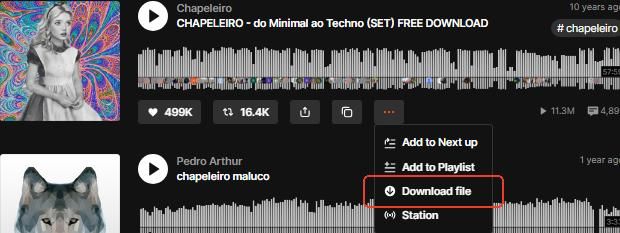
Additionally, some tracks may have a "Free Download" option, allowing you to download them directly.

Video Guide: How to Download SoundCloud Music on iPhone/Desktop
Note:
While SoundCloud Go/Go+ enables "offline listening", these tracks are saved as encrypted, DRM-protected cache files exclusively within the mobile app. This means you can only download SoundCloud on iPhone or Android offline. Since the files are not standard MP3s, they can't be transferred to your computer for use in other media players.
Part 2. How to Download Songs from SoundCloud to Computer via Desktop Downloader
When it comes to preserving your SoundCloud library, a dedicated desktop downloader is a smart choice for securely saving your favorite tracks and playlists. DRmare Streaming Audio Recorder stands out as a premier solution. It enables you to download ****SoundCloud songs across various formats, including MP3, FLAC, WAV, M4A, AIFF, and M4B, which allows you play SoundCloud on DJ software and is compatible with any media player. Furthermore, it allows you to download SoundCloud music on PC or Mac permanently while preserving full ID3 tags.
- Step 1Customize Your Output Preferences for SoundCloud
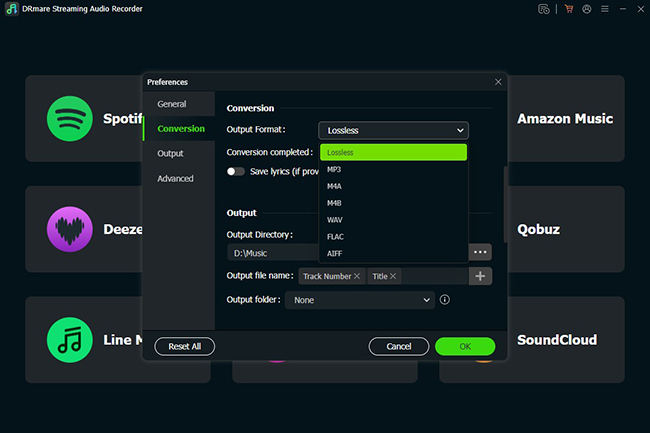
Before you begin backing up your SoundCould library, consider setting up the output format to meet your audio needs. Navigate to the menu icon and select "Preferences > Conversion". For the best listening experience, you can also change the bit rate and sample rate to ensure the highest fidelity.
- Step 2Launch the Integrated Web Player
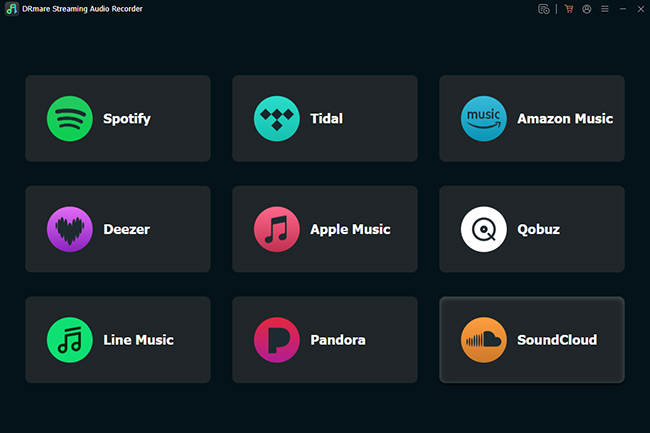
Then use the built-in SoundCloud web player accessible directly through the DRmare interface. Sign in to your SoundCloud account to load your personalized music library on SoundCloud.
- Step 3Select SoundCloud Playlists for Downloading
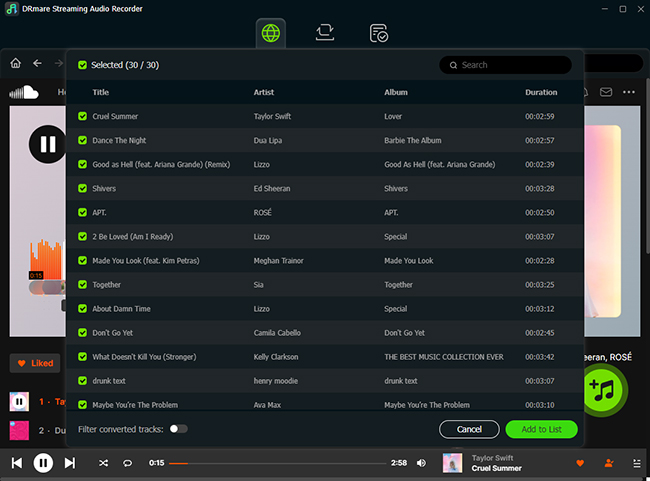
Find the playlists or top-played songs you wish to preserve. By using the "Add" and "Add to List" features, you can import your favorite tracks and playlists into the download queue.
- Step 4Convert and Download Music from SoundCloud to Mac/PC
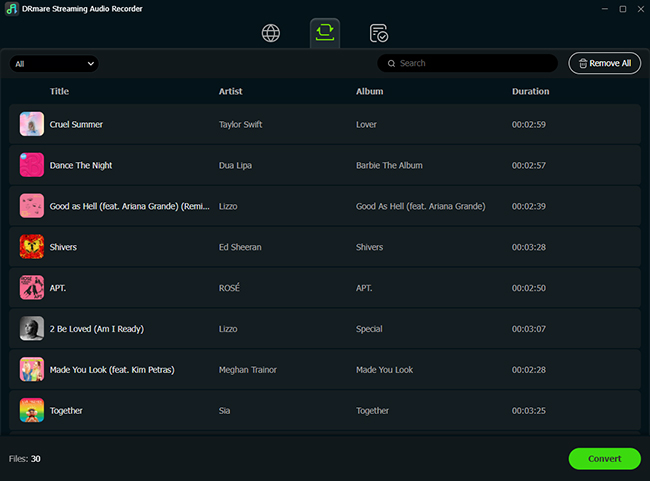
With your tracks queued up, click the "Convert" button to initiate the downloading process. DRmare will process the audio and save SoundCloud tracks to PC or Mac directly. Once finished, you can find your files in the "Converted" history tab or your designated local folder.
Part 3. How to Download Music from SoundCloud to Mac/Windows Computer Online
If you want to avoid installing additional software, online SoundCloud downloaders for Mac or PC offer a quick and easy solution. Tools like MusicVerter and KlickAud make it easy to grab SoundCloud tracks to a desktop. All you need is the track's URL, and you can download the song directly to your computer.
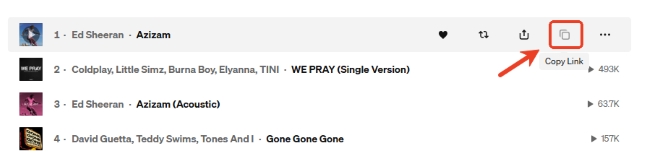
Step 1. Find the track you want to download on SoundCloud and click the "Copy Link" option next to it.
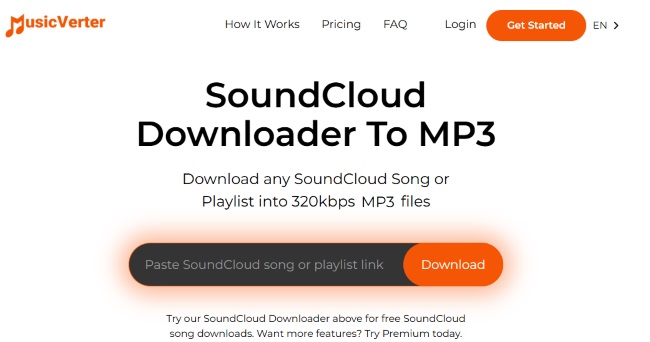
Step 2. Head over to the MusicVerter website, just paste the copied link and click "Download" to save the track as an MP3 file on your computer.
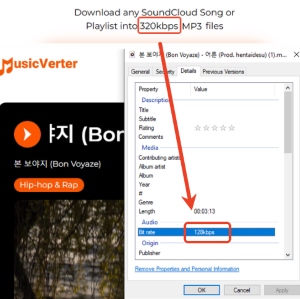
Test result:
The audio quality of online downloaders can vary widely. Some claim 320kbps, but it only delivers 128kbps. Additionally, some downloaders may compress the audio, degrading the sound quality. So it's best to test the files before relying on them.
Part 4. How to Download SoundCloud Songs to Computer with Browser Extensions
While SoundCloud downloader offers robust features, some users prefer a more integrated approach. If you want to download SoundCloud music for PC or Mac without leaving your tab or launching external programs, browser extensions are an alternative. Below, we'll explore 3 SoundCloud downloader extensions for Chrome and Firefox.
Addoncrop SoundCloud Music Downloader
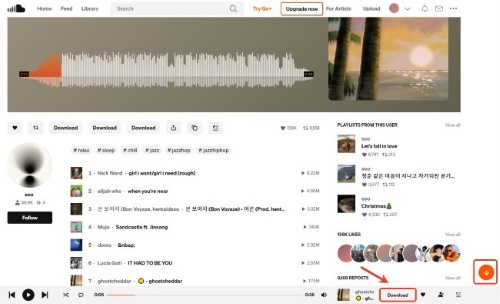
If you're looking for a versatile tool, Addoncrop is a fantastic choice. It works across almost every browser, from Chrome and Edge to Brave and Vivaldi. What makes it special is its built-in editor, which lets you trim or cut audio to your exact liking before saving. It can download both single tracks and full playlists from SoundCloud to MP3 with ID3 tags included.
SoundCloud Enhanced Pro
For listeners who prioritize ethical downloading and license-friendly audio, SoundCloud Enhanced Pro is the go-to Chrome extension. It focuses on helping you discover and download royalty-free or artist-permitted tracks. It also features a handy download history, so you can easily revisit your favorite finds later.
SoundCloud Downloader by NotTobi
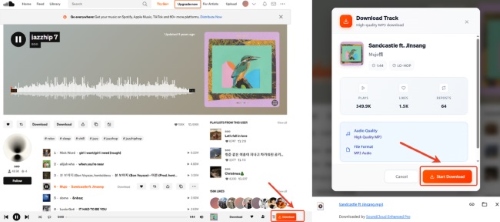
This SoundCloud Downloader extension is for users who value speed and clean metadata. It utilizes SoundCloud's own APIs rather than sketchy third-party sites, ensuring a safer experience. It automatically embeds the correct artwork, artist info, and album titles into your files. There is a cool bonus that it can download SoundCloud to M4A files for Go+ users.

Test Result:
The extension doesn't work with some songs. When clicking the download button, it appears unresponsive, with no download starting. This could be due to track restrictions or the extension not supporting certain file formats.
Part 5. Best Way to Download Songs from SoundCloud on PC/Mac
| Feature | Official Method | Desktop Downloader | Online Downloader | Browser Extensions |
|---|---|---|---|---|
| Success Rate | Low (Artist-limited) | High (Any Track) | Moderate | Moderate |
| Audio Quality | Original (up to 256kbps) | Lossless (Up to 320kbps) | Standard (128 kbps) | Standard (128 kbps) |
| Metadata/Tags | Basic | Full ID3 Tags | Limited | Basic |
| Batch Download | X | √ | X | Limited |
| Security | High | High | Low (Ads/Pop-ups) | Moderate |
| Best For | One-off free tracks | High-quality, organized downloads | Quick and no installation | In-browser and integrated solutions |
Ultimately, while SoundCloud's official download feature is the most secure, its availability is entirely up to the artist's permissions. For those who need a 100% success rate with high-fidelity audio, DRmare Streaming Audio Recorder is the most reliable investment. Alternatively, online converters and browser extensions offer quick and free solutions, though they often trade off some sound quality and metadata accuracy.

 Home
Home




User Comments
Leave a Comment